Magnetic 3-in-1 Charger Stand for iPhone, Watch, AirPods
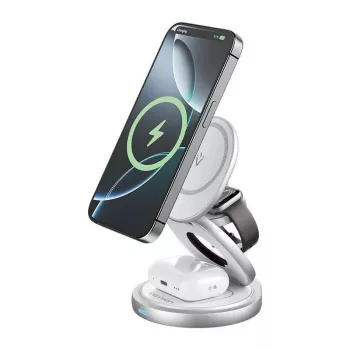
3-in-1 Magnetic Wireless Charger Stand for iPhone, iWatch & AirPods
A single stand that powers an iPhone, Apple Watch, and AirPods helps keep daily charging simple, tidy, and consistent—especially on a nightstand or work desk. Instead of juggling multiple cables (and multiple places to set devices down), a magnetic 3-in-1 stand consolidates your routine into one dependable spot, so your essentials are easier to grab on the way out.
Below is a practical breakdown of what this type of charger stand does best, what to check for compatibility, and how to get steadier performance from everyday wireless charging.
What a 3-in-1 magnetic charging stand does
- Charges up to three Apple devices in one place: phone + watch + earbuds.
- Magnetic phone mounting helps align the charging coil for steadier, more consistent charging contact.
- Stand-style design keeps the iPhone visible for clocks, calls, and notifications while it charges.
- Reduces cable clutter by consolidating charging into a single footprint on your desk or nightstand.
Magnetic alignment is the quiet “quality of life” feature. When a phone lands in the right spot automatically, it’s easier to trust that charging actually started—no second-guessing before bed.
Design highlights that matter day to day
- A stable base: Helps prevent wobble when tapping the screen, snoozing alarms, or placing/removing devices one-handed.
- Dedicated charging zones: Separate areas for iPhone, Apple Watch, and AirPods reduce overlap and misalignment.
- Nightstand-friendly layout: Keeps phone, watch, and earbuds together so they’re easy to find in the dark.
- Desk-ready viewing angle: Props the iPhone at a readable angle so notifications and calls are visible while charging.
For daily use, “no fuss” matters more than specs. A stand that doesn’t slide around, and makes each device feel like it has a defined home, tends to get used consistently.
Compatibility checklist for iPhone, Apple Watch, and AirPods
- iPhone: Magnetic attachment works best with MagSafe-compatible iPhones and MagSafe cases (or a MagSafe ring accessory).
- AirPods: Wireless charging requires a Qi-compatible case (AirPods with Wireless Charging Case or MagSafe Charging Case; AirPods Pro with a wireless-capable case).
- Apple Watch: Use the watch charging area as intended to ensure secure contact and reliable charging.
- Cases and accessories: Thick cases, metal plates, and some grips can weaken magnetic hold and reduce charging efficiency.
| Device | What to check | Practical tip |
|---|---|---|
| iPhone | MagSafe-compatible phone/case or magnetic ring | If the phone slides, remove thick cases or switch to a MagSafe-compatible case for stronger alignment. |
| Apple Watch | Correct placement on the watch charging spot | Seat the watch flat and centered; adjust the band so it doesn’t lift the watch off the charging surface. |
| AirPods | Qi wireless charging case required | If charging is intermittent, reposition the case and confirm the case indicator orientation matches the charging zone. |
For more detail on Apple’s magnetic ecosystem and supported models, see Apple Support: About MagSafe on iPhone. For wireless charging basics and Qi compatibility, the Wireless Power Consortium (Qi) overview is a helpful reference.
Power, speed, and what affects wireless charging performance
- Alignment drives results: Wireless charging speed depends heavily on coil alignment, device support, and the power adapter feeding the stand.
- Heat management is normal: Some warmth is expected. Excess heat can slow charging as devices protect long-term battery health.
- Background use changes the math: Navigation, video calls, gaming, or hotspot use can reduce net charging gain.
- Use a quality adapter: A reputable wall adapter and cable typically deliver more stable performance than bargain power bricks.
When charging feels inconsistent, the fastest fix is often the simplest: re-seat the phone so the magnets “snap” into position, then wait a few seconds to confirm it’s charging. If problems persist, test without the case to isolate whether the case is causing heat buildup or misalignment.
How to set it up for a cleaner nightstand or desk
- Pick a flat, low-traffic surface: Leave enough room to lift devices on/off without dragging the stand.
- Route the cable with slack: A taut cable can pull the stand off-center and cause devices to shift.
- Night use: If supported, enable iPhone StandBy and choose a low-brightness clock view so the phone stays readable without lighting up the room.
- Work use: Align the iPhone magnetically first, then let it settle—this helps avoid “almost aligned” placement that can slow or interrupt charging.
For Apple Watch placement tips and charging guidance, Apple Support: Charge Apple Watch outlines best practices that also apply to multi-device stands.
Care and safety tips for long-term reliability
Who this stand is best for
In-stock picks
- 3-in-1 Magnetic Wireless Charger Stand for iPhone, iWatch & AirPods ($46.82)
- AI-Powered Checklist for Better Sleep Adventures | Digital Sleep Guide for Relaxation, Lucid Dreaming & ai suggestions for better dreams ($4.99)
- Men’s Quick-Dry Short Sleeve Sports Shirt – Lightweight Workout & Running Top ($35.82)
FAQ
Will it charge an iPhone through a case?
Usually yes with many standard cases, but thick cases, metal parts, or non-MagSafe accessories can weaken the magnetic hold and reduce charging efficiency. For the most reliable alignment, a MagSafe-compatible case is typically the easiest upgrade.
Do AirPods need a special case for wireless charging?
Yes. AirPods must have a Qi-compatible wireless charging case (including MagSafe charging cases) to charge on the AirPods spot.
Why does wireless charging sometimes feel slow?
Wireless charging speed can drop when alignment isn’t perfect, the device warms up and throttles charging, or the phone is doing heavy background tasks. Re-seat the device, try without a thick case, and use a reliable wall adapter to improve consistency.









Leave a comment